" The access control is offline again. Visitors can't get in, I'm on a business trip abroad, and my parents are anxious at home ";" The community access control only supports card swiping. The elderly are stopped outside when they forget their cards, which is very inconvenient ";" Visitor registration in office buildings is cumbersome, paper records are easy to lose, and safety traceability is impossible ";" Traditional access control relies on broadband for communication. The signal is poor in remote parks, and it fails at critical moments "...
In scenarios such as communities, office buildings, industrial parks, and villas, access control, as the first line of safety defense, often becomes a "headache" for users and managers due to problems such as "unstable communication, single unlocking method, low management efficiency, and lack of safety guarantee". Traditional access control either relies on a single network and fails when offline; or has limited unlocking methods and cannot meet the needs of different groups of people; or lacks intelligent linkage. Visitor management and safety traceability all rely on manual work, resulting in low efficiency.
To solve these pain points, after many rounds of R & D and testing, we have launched the "4G Telephone Line Video Intercom Intelligent Access Control" - with 4G + telephone line dual network as the core, integrating multiple functions such as video intercom, multi-dimensional unlocking, intelligent monitoring, and customized settings. It not only makes up for the shortcomings of traditional access control, but also redefines the user experience of access control systems with four core advantages of "stability, safety, intelligence, and convenience", becoming the "ideal access control solution" for property management, enterprises, and owners.
I. Product Overview: More Than Just Access Control, It's an Intelligent Access Management Center
This 4G telephone line video intercom intelligent access control is not a simple "door opening tool", but an intelligent access management center integrating "communication, intercom, unlocking, monitoring, and management". The product has a built-in 4G module, supporting 4G and telephone line dual-mode communication, without relying on broadband, covering various scenarios such as no network and weak network; equipped with a 3-megapixel CMOS camera, combined with white light fill light, it can capture clear images even in low illumination of 0.1lux; supports Tuya App video intercom and voice intercom dual modes, enabling real-time visual communication between visitors and residents; provides 6 unlocking methods including password, ID card, App, button, postal lock, and linkage unlocking, meeting all-scenario access needs; at the same time, it has a built-in intelligent recording system, timing management system, and linkage control system, suitable for multiple scenarios such as communities, office buildings, villas, industrial parks, schools, and hospitals. Both ordinary residents and property managers can obtain efficient, safe, and convenient user experience.
Following the design concept of "practicality first", the product has a working voltage of DC 12 ~ 18V, a working temperature range of -10 ℃ ~ 70 ℃, and a storage temperature of -20 ℃ ~ 70 ℃. It can operate stably whether in the severe cold of the north or the scorching heat of the south; the body is equipped with a waterproof sponge sticker and a rainproof cover, with excellent protection performance, and can be installed outdoors without worry; the operation interface is simple and intuitive, supporting the switching of multiple languages such as Chinese, English, and French, so that the elderly and children can easily use it.
II. Dual-Network Communication Guarantee: Uninterrupted Signal, Unobstructed Access
Stable communication is the core foundation of the access control system. This product innovatively adopts the "4G + telephone line" dual-mode communication design, which completely solves the pain point of traditional access control relying on a single network and being prone to disconnection.
1. Free Switching Between Dual Modes, Adapting to All Scenarios
The product supports one-key switching between 4G mode and telephone line mode, and users can flexibly choose according to actual scenario needs:
· 4G mode: Relying on the built-in 4G module, it can be used without broadband. It has wide signal coverage, suitable for remote parks, newly built communities, areas without broadband coverage, or as an emergency communication solution when broadband fails;
· Telephone line mode: Communication is realized by connecting to a traditional telephone line, with stable signal and low cost. It is suitable for communities and office buildings with existing telephone line deployment, or scenarios with high requirements for communication stability.
The switching operation is simple and convenient: enter "Project Settings - System Mode" in the system settings, and select the corresponding mode with the number key. After successful switching, the system will give a clear prompt. When the 4G module is not detected, the system will switch to telephone line mode by default; if the telephone line is not connected, the mode will be disabled by default to ensure communication reliability.
2. Real-Time Signal Display, Clear Status at a Glance
The upper left corner of the product's main interface displays the 4G signal strength, the communication standard used, and the connection status of the SIM card, telephone line, and network in real time - if no SIM card is inserted, the "No SIM" icon is displayed; if the telephone line is not inserted, the corresponding icon is gray; if the network is not connected, the network icon is gray. This allows users to intuitively grasp the communication status and troubleshoot problems in advance.
Whether it is severe weather such as heavy rain and typhoons, or temporary failures of network operators, the dual-network redundancy design can ensure that the access control communication is not interrupted, and core functions such as visitor calls and remote unlocking can be used normally, truly realizing "all-weather, no-dead-angle" communication guarantee.
III. All-Scenario Intercom Experience: Visual Communication, More Efficient Visitor Management
Visitor calling and communication are one of the core functions of access control. This product provides dual modes of "voice intercom + Tuya App video intercom", combined with two calling methods, to meet communication needs in different scenarios and make visitor management more efficient and safe.
1. Two Calling Methods, Adapting to Different Needs
Visitors can initiate calls in two ways, which are simple to operate and require no additional learning:
· Directly enter the room number to call: Enter the resident's room number on the main interface (the room number of the management center is "0"), and press the "Call" key to initiate the call, which is suitable for visitors who know the room number;
· Call by viewing the resident list: Press the "View Resident List" key on the main interface, and the screen will display all registered resident room numbers and names. Visitors can select the target resident with the up and down keys and press the "#" key to initiate the call, which is suitable for visitors who forget the room number or are not familiar with the resident distribution.
2. Dual Intercom Modes of Voice + Video, Clearer Communication
After the call is initiated, the system will enter the intercom mode selection interface, and visitors can choose "Voice Intercom" or "Video Intercom":
· Voice intercom: Press the number key "1" to enter. The interface displays the target room number and call duration. Before connecting, it shows "Waiting for the other party to connect...". After connecting, the resident can communicate with the visitor by voice through the mobile phone, and remotely unlock after confirming the identity; if the call is not answered after timeout, the system will automatically call the next associated number (in 4G mode), or the visitor can press the "Down" key to manually switch to the next number to avoid missing calls.
· Video intercom: Press the number key "2" to enter. Visual communication is realized relying on the Tuya App - the resident's mobile phone needs to be bound to the device UUID in advance (it can be completed by scanning the QR code generated by the device. If the App is not installed, it will automatically jump to download after scanning). After connecting, the resident can view the 3-megapixel high-definition video at the door in real time through the App (the camera angle is 132° × 111° × 59°, supporting white light fill light, which is clear at night), have a real-time conversation with the visitor, and intuitively confirm the visitor's identity with higher safety.
3. Adaptation to Special Scenarios, No Shortcomings in Experience
The product has been humanizedly adapted to different usage scenarios:
· If the resident has not added a Tuya UUID, it will automatically jump to the voice intercom interface after calling to avoid functional failure;
· If the UUID has been added but not bound to the mobile phone, the system will prompt "Tuya is not bound to the mobile phone, and the call cannot be made" when selecting video intercom, guiding the resident to complete the binding;
· During the call, the resident can send DTMF codes through the mobile phone keyboard (the default for the main door is "*", and the default for the auxiliary door is "#") to quickly unlock without additional operations; after the call ends, the system automatically returns to the main interface without affecting subsequent use.
As a mature intelligent device management platform, the Tuya App has a simple and intuitive operation interface, supporting functions such as video recording and screenshot. Residents can retain visitor video records for subsequent query, further improving safety.
IV. Multi-Dimensional Unlocking Solution: Meeting the Needs of All Groups, More Convenient Access
The diversity of unlocking methods directly determines the practicality of access control. This product provides 6 unlocking methods, covering all scenarios such as residents, visitors, and emergencies, meeting the use needs of different groups such as the elderly, children, and the disabled, and making access more convenient and flexible.
1. Password Unlocking: Two Password Modes, Adapting to Different Scenarios
Password unlocking is divided into two modes: "user password" and "public password", which flexibly adapt to the daily access of residents and the temporary access of visitors:
· User password unlocking: The resident enters his/her own room number and preset password (4-6 digits), and presses the "#" key to unlock. The system prompts "Unlocking successful! Welcome: XXX", which is more secure and only available to the corresponding resident;
· Public password unlocking: No need to enter the room number, directly enter the public password (4-6 digits, which can be uniformly set and modified by the property), and press the "#" key to unlock. It is suitable for high-frequency access groups such as temporary visitors, couriers, and cleaners, without the need for separate authorization.
Password settings support flexible adjustments: the public password can be modified in "Unlock Settings - Password Unlock", the user password is set by the resident himself/herself, and the property can reset it through the system management interface. If the wrong room number or password is entered, the system will give a clear warning to avoid illegal unlocking.
2. ID Card Unlocking: Swipe and Pass, Convenient and Efficient
Residents can enter their personal ID card information into the system (through the "Guard/Resident Management - Add" function, enter the ID card number), and when using it, attach the ID card to the card reader attached to the device to quickly unlock, without entering a password or operating buttons. It is suitable for groups such as the elderly and children who are not good at operating electronic devices, and also for residents' daily quick access.
3. Button Unlocking: Taking into Account Emergencies and Daily Use
The product is equipped with a variety of physical button unlocking methods, adapting to emergency and daily scenarios:
· Main door/auxiliary door exit button: Install an exit button inside the door. Residents can unlock it by pressing it when going out, without swiping a card or entering a password, which is suitable for daily access;
· Postal lock button: After connecting the postal lock, press the button to unlock, which is suitable for postal delivery personnel;
· Fire alarm button: After connecting the fire alarm device, press the button in an emergency, and the system will automatically unlock the main door and auxiliary door, and trigger an alarm record at the same time to ensure the rapid evacuation of personnel, in line with fire safety requirements;
· Universal input button: It can be custom-bound to other devices, and unlocking is triggered by pressing it, adapting to special scenario needs.
4. App Unlocking: Remote Control, Flexible and Convenient
After binding the Tuya App, residents can remotely unlock the main door or auxiliary door through the App without being present - whether on a business trip, when a visitor arrives temporarily, or when a family member forgets to bring a card, they only need to open the App and click the corresponding door lock icon to unlock. At the same time, the system will record the unlocking time and method for traceability, taking into account convenience and safety.
5. Linkage Unlocking: Intelligent Trigger, Automatic Access
The product supports linkage unlocking function, which can trigger unlocking in linkage with other devices: for example, set "universal input trigger unlocking". When the associated device (such as an infrared sensor, human body detector) detects a signal, the system will automatically unlock the corresponding door lock, which is suitable for unattended scenarios (such as industrial parks, warehouses) and improves access efficiency.
6. Wiegand Unlocking: Adapting to Access Control Expansion
The product is equipped with a Wiegand lock interface (A/B 1/2), which can be connected to a Wiegand card reader, supporting independent setting of unlocking permissions for Wiegand 1 and Wiegand 2 (main door, auxiliary door, or all doors). It is suitable for scenarios that need to expand access control points (such as multiple entrances of office buildings, linkage between community unit doors and main gates), with stronger compatibility.
V. Intelligent Monitoring and Recording System: Transparent Safety, Traceable
Safety is the core value of access control. This product has a built-in intelligent monitoring and recording system, which records all processes of visitors, unlocking, and alarms, and retains photos, making the safety status transparent and traceable, and eliminating potential safety hazards.
1. Three Types of Records, Full Coverage
The system supports three types of records, covering all scenarios of access control use:
· Visitor records: Automatically record the call time, target room number, and call method (voice/video) of all visitors, and take photos of visitors during video intercom. Residents and property can query by date through "Log View - Visitor Records" to learn about visitor visits;
· Unlocking records: Detailedly record the time, room number, and unlocking method (password/ID card/App/button/linkage) of each unlocking. Whether it is the daily access of residents or the temporary unlocking of visitors, there is a trace to follow. If illegal unlocking occurs, it can be quickly traced;
· Alarm records: Record the time and type of alarm events such as fire alarms, illegal unlocking, and communication abnormalities, and promptly remind the property or residents to deal with them, preventing potential safety risks.
2. Convenient Record Query, Simple Operation
When querying records, users only need to enter the "Log View" interface in the system settings, select the corresponding record type, select the query date with the up and down keys, and press the "#" key to view detailed information - visitor records can view visitor images, unlocking records can view unlocking methods, and alarm records can view event types. After querying, press the "Menu" key to return. The operation logic is clear, and no professional skills are required.
3. Real-Time Monitoring Function, Preventing Problems Before They Occur
The product supports real-time monitoring function. Residents can check the real-time video at the door through the Tuya App at any time to learn about the situation outside the door without initiating a call; at the same time, the system supports alarm monitoring. When abnormal situations such as illegal unlocking and fire alarms are detected, it will promptly trigger an alarm prompt (linkage with alarm lights or alarms) and record relevant information, so that potential safety hazards can be detected and handled early.
VI. Flexible Customized Settings: Adapting to All Scenarios, More Efficient Management
Different scenarios have different requirements for access control. This product provides rich customized setting functions, from timing management and system parameters to engineering customization, fully adapting to the management needs of different scenarios such as communities, office buildings, and industrial parks, making management more efficient and flexible.
1. Timing Management: Time-Period-Based Permission Control
Through the "Timetable" function, administrators can set the allowed time for different operations to achieve refined management:
· Allow Dialing Time: Set the time period during which visitors can initiate calls. If calling outside the time period, the system will prompt "Timetable restriction, current function disabled" to avoid night harassment;
· Allow Automatic Unlocking Time: Set the time period for automatic door unlocking (default "Never"), which is suitable for high-frequency access scenarios such as peak commuting hours in parks and school hours, improving access efficiency;
· Allow Password Unlock Time: Set the valid time period for password unlocking, and disable password unlocking outside the time period to improve safety;
· Allow Card Swiping and Door Opening Time: Set the valid time period for ID card unlocking, adapting to special scenarios (such as office buildings only allowing card swiping during working hours);
· Allow Postal Lock Usage Time: Set the valid time period for the use of postal locks to avoid use during non-delivery hours;
· Allow Correlation Time: Set the valid trigger time period for linked devices to avoid invalid linkage.
Each timing item supports three options: "Always Allow", "Never Allow", and "Custom Time Period". The custom time period can set 6 different time periods, and the effective date can be selected by week to meet the needs of complex scenarios.
2. System Parameter Settings: Personalized Adaptation
Users can adjust system parameters according to actual needs to improve the user experience:
· Language Settings: Supports switching between three languages (Chinese, English, French), adapting to use in different regions;
· Time Settings: Can set the time zone (default China Standard Time), time format (Day/Month/Year or Year/Month/Day), whether to enable network time, as well as call duration (10-300 seconds, default 60 seconds), main/auxiliary door unlocking duration (1-60 seconds, default 10 seconds), and call transfer duration (10-60 seconds, default 30 seconds), flexibly adapting to different scenarios;
· Sound Settings: Can adjust the speaker volume (0-5 levels), microphone volume (0-5 levels), 4G speaker volume (1-5 levels), 4G microphone volume (1-8 levels), and can enable/disable voice prompts (when enabled, there will be voice feedback when pressing keys, dialing, and unlocking), improving the operation experience;
· Keyboard Settings: Can select the keyboard light mode (Automatic/Steady On) and keyboard timeout time (10-30 seconds, default 10 seconds), adapting to different light environments.
3. Engineering Customization Settings: Meeting Professional Needs
For property and engineering personnel, the product provides rich engineering customization functions to adapt to the deployment of complex scenarios:
· Input/Output Settings: Can set the trigger mode (Unsupervised/Open Circuit/Short Circuit) of postal locks, fire alarms, universal input, and main/auxiliary door exit buttons, as well as the working mode (Normally Open/Normally Closed) of main/auxiliary door locks and universal output (which can be connected to lighting and alarm lights), adapting to the linkage needs of different devices;
· DTMF Settings: Can modify the DTMF unlocking codes of the main/auxiliary doors (supporting 0-9, *, #) to ensure unlocking safety (the main and auxiliary door codes cannot be the same);
· Dial Settings: Can enable/disable the automatic dialing function, set the number of automatic dialing digits (1-6 digits, default 4 digits). After enabling automatic dialing, visitors only need to enter the set number of digits of the room number to call automatically without pressing the "Call" key. If the number of digits is insufficient, they still need to press the "Call" key to confirm, improving access efficiency;
· Correlation Settings: Can set the trigger conditions (postal lock/fire alarm/universal input/main door unlocking/auxiliary door unlocking), output actions (On/Off), and duration (0-255 seconds, default 30 seconds) of universal output 3/4. For example, set "Fire alarm triggers universal output 4 (alarm light) to turn on for 30 seconds" to improve emergency response capabilities;
· Engineering Testing: Supports functions such as audio testing, video testing, display screen testing, voice testing, system restart, and factory reset, facilitating installation, commissioning, and troubleshooting by engineering personnel.
VII. Convenient Installation and Humanized Design: Reducing the Threshold of Use, Adapting to All Scenarios
In terms of installation and design, the product fully considers practicality and convenience, reducing installation costs and the threshold of use, and adapting to different installation environments.
1. Simple Installation Steps, Completed in 10 Minutes
The product installation does not require complex processes, and can be quickly completed by property or engineering personnel:
· Step 1: Take out the waterproof sponge sticker included in the package;
· Step 2: Mark the height on the installation wall (4250px from the ground), ensure the device is vertical and horizontal, drill holes at the marked positions with tools, and insert plastic columns;
· Step 3: Remove the device's rainproof cover, align the mounting holes with the plastic columns, install the fastening screws to fix the device, and then reinstall the rainproof cover to complete the installation.
The overall design of the device is compact, and the mounting holes are accurately matched with the waterproof sponge, which effectively prevents rainwater from seeping in and ensures safe outdoor use; the installation height of 4250px conforms to ergonomics, facilitating the elderly and children to operate the keyboard.
2. Humanized Detail Design, More Comfortable to Use
The product fully considers the user experience in details, making it more convenient and safe to use:
· Simple Operation Interface: The main interface clearly displays core functions (enter room number to call, view resident list, password unlock, settings), with large and clear buttons and clear labels, which can be easily operated by the elderly and children;
· Waterproof and Dustproof Design: The body is equipped with a rainproof cover and a waterproof sponge sticker, with excellent protection performance, and can adapt to harsh outdoor environments;
· Low Power Consumption Design: Static working current ≤ 0.25mA (DC 12V), working current ≤ 700mA (DC 12V), energy-saving and environmentally friendly, reducing use costs;
· Clear Fault Prompt: When there are situations such as no SIM card inserted, no telephone line connected, network abnormality, or wrong password, the system will give clear icon or text prompts, facilitating quick troubleshooting.
VIII. Intelligent Platform Linkage: Remote Management, Data Synchronization
To improve management efficiency, the product is equipped with an intelligent access control management platform, supporting real-time data synchronization between the device terminal and the computer terminal. The property or enterprise can achieve remote management through the platform without on-site operation, making management more efficient.
1. Core Functions of the Platform
The intelligent access control management platform provides rich management functions, covering core needs such as device management, user management, and record query:
· Device Management: Can remotely view the device status (online/offline, communication mode, signal strength), modify device parameters (such as timing settings, unlocking passwords, linkage rules), and initiate operations such as remote restart and factory reset;
· User Management: Can batch add, edit, and delete resident information (room number, name, mobile phone number, ID card number, UUID) without on-site operation, improving management efficiency;
· Record Query: Can remotely query visitor records, unlocking records, and alarm records of all devices, support filtering by time, room number, and record type, and export Excel reports for easy archiving and statistics;
· Permission Management: Supports multi-role permission settings (administrator, operator, viewer), with different roles having different operation permissions to ensure management safety.
2. Data Synchronization and Convenient Operation
The data between the device terminal and the platform terminal is synchronized in real time to ensure information consistency: the information registered by residents on the device terminal will be automatically synchronized to the platform, and the parameters modified on the platform will also be issued to the device in real time; at the same time, users can generate temporary visitor passwords through the platform with a customizable validity period. After the visitor unlocks with the temporary password, the system will record relevant information for easy traceability.
We will provide customers with exclusive agent accounts, and customers can directly log in to the platform for management. For specific operations, please refer to the "Intelligent Access Control Platform Operation Manual". The platform interface is simple and intuitive, and can be used without professional skills.
IX. Full Coverage of Application Scenarios: More Than Communities, Adapting to Multiple Industries
With its stable communication, rich functions, and flexible customization, this 4G telephone line video intercom intelligent access control can be widely used in multiple scenarios, becoming a "safe access solution" for different industries.
1. Residential Communities
· Pain Points: Difficult visitor management, inconvenient access for the elderly and children who forget their cards, night call harassment, slow fire emergency response;
· Solution: 4G + telephone line dual communication guarantee, usable even when offline; video intercom + multiple unlocking methods, visitors do not need to register, and residents can unlock remotely; the timing management function can disable night calls to avoid harassment; fire alarm linkage unlocking improves emergency response speed; the property manages resident information in batches and queries records through the platform, with higher efficiency.
2. Office Buildings/Business Parks
· Pain Points: Low employee access efficiency, cumbersome visitor registration, difficult management of multiple entrances, no safety traceability;
· Solution: ID card + password + App unlocking, employees can pass quickly; visitors can call by viewing the resident list or entering the room number without front desk registration; multi-device linkage management, the platform uniformly views the status of all entrances; all access records are retained in real time for traceability, ensuring office safety.
3. Villas/Detached Houses
· Pain Points: Difficult to confirm visitor identity, unable to unlock remotely, high safety protection requirements;
· Solution: Tuya App video intercom, remotely visually confirm visitor identity; App remote unlocking, no need to be present in person; alarm records + real-time monitoring, improving home safety; the postal lock function facilitates courier delivery without opening the door.
4. Industrial Parks/Warehouses
· Pain Points: No broadband coverage, need for multi-area linkage, difficult management of unattended scenarios;
· Solution: 4G mode without broadband, wide signal coverage; universal input/output interfaces can link lighting, alarm lights, and infrared sensors to achieve unattended operation; the timing automatic unlocking function adapts to peak commuting hours, improving access efficiency; remote management through the platform without on-site attendance.
5. Schools/Hospitals
· Pain Points: Large personnel flow, complex visitor management, need for quick unlocking of emergency channels;
· Solution: Public password + ID card unlocking, adapting to different groups such as teachers and students, medical staff, and visitors; fire alarm linkage unlocks all door locks to ensure emergency evacuation; the timing management function can set access time periods to prohibit irrelevant personnel from entering during non-time periods; all records can be traced to ensure campus/hospital safety.
X. Safety Guarantee and Technical Parameters: Quality Endorsement, a Trustworthy Choice
The reliability and safety of the product are the core competitiveness. This 4G telephone line video intercom intelligent access control strictly checks the technical parameters and safety design to ensure long-term stable operation.
1. Core Technical Parameters
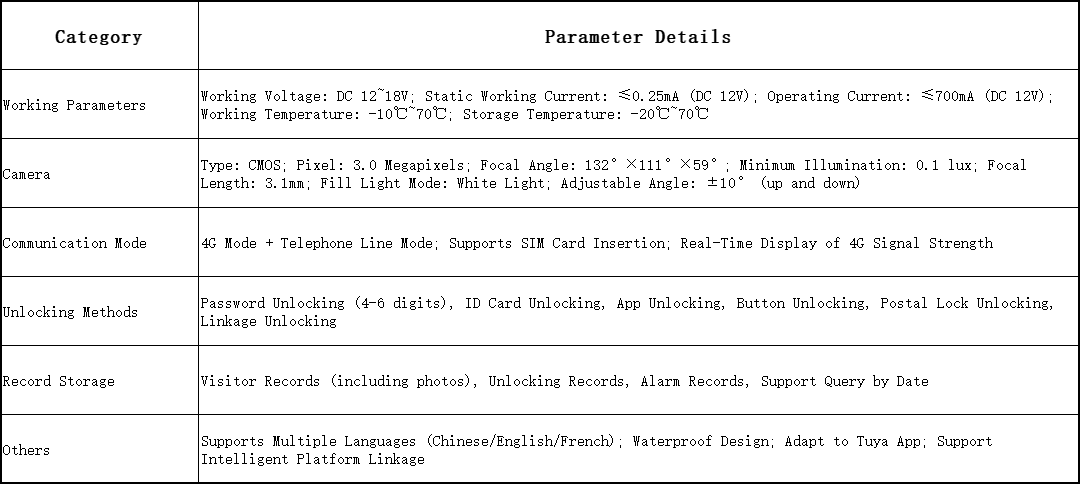
2. Safety Design Highlights
· Permission Classification: Hierarchical management of administrator passwords (initial 123456), user passwords, and public passwords. Different permissions correspond to different operations to prevent illegal modification of settings;
· Password Protection: Entering the wrong password will trigger a system warning, and the lock mechanism can be set for multiple errors (configurable on the platform) to prevent brute force cracking;
· Fire Linkage: After a fire alarm is triggered, the main/auxiliary doors are automatically unlocked to ensure personnel evacuation, in line with fire safety requirements;
· Data Encryption: Data transmission between the device, platform, and App adopts an encryption protocol to prevent information leakage;
· Physical Protection: The body is waterproof and dustproof, and the core components are made of industrial-grade materials, adapting to harsh environments and extending service life.
XI. User Testimonials: Word-of-Mouth Certification in Real Scenarios
Manager Zhang of a Residential Community Property:
"Previously, our community used traditional broadband access control, which couldn't be used once offline, and there were constant complaints from owners. After switching to this 4G + telephone line dual-mode access control, there has been no communication interruption. Visitors can directly enter the room number or check the list to call, and residents can unlock remotely after video confirmation, which greatly reduces the pressure of property registration. The timing management function can also disable night calls to avoid harassment, and the owner satisfaction has been greatly improved!"
Ms. Li, Administrator of an Office Building:
"There are many employees and complex visitors in the office building. Previously, visitor registration took a lot of time and was prone to errors. This access control supports employees to pass quickly with ID cards, and visitors can call by viewing the resident list. Employees can video confirm their identity and unlock remotely in the office, which is much more efficient. Moreover, the platform can manage employee information in batches and query access records, making management particularly convenient."
Mr. Wang, Villa Owner:
"I often go on business trips, and my parents can't get in when they forget their cards, which is very troublesome. After switching to this access control, my parents can unlock with ID cards or passwords. When I'm on a business trip and a visitor comes, I can video confirm and unlock remotely through the Tuya App, which is especially worry-free. The camera is also clear at night, and I can check visitor records, so home safety is more guaranteed."
Conclusion: Choose a Good Access Control, Choose a Peaceful Life
Access control is not only a physical barrier, but also a manifestation of a safe and convenient lifestyle. This 4G telephone line video intercom intelligent access control solves the stability pain point with "dual-network communication", the communication pain point with "all-scenario intercom", the access pain point with "multi-dimensional unlocking", and the efficiency pain point with "intelligent management", fully meeting the needs of different scenarios such as communities, office buildings, villas, and industrial parks.
Whether it is the efficient management pursued by property managers or the safety and convenience pursued by ordinary users, this product can give a perfect answer. At present, the product has been widely used in communities, office buildings, and parks in many cities across the country, and has won consistent recognition from customers.
If you are still troubled by various problems of traditional access control, you may wish to choose this 4G telephone line video intercom intelligent access control to make access more efficient, safe, and warm! Now visit our official website to view more product details, book on-site demonstrations, or consult procurement plans. We will provide you with professional pre-sales consultation and after-sales service to ensure you have no worries!
Copyright.(C) 2008-2014 ZHUHAI DAEGEN ELECTRONICS CO., LTD All Rights Reserved
Zhuhai Daegen Electronics Co., Ltd
ADD: F. 3, Building 7, Huada Industrial Zone, No. 856, Renmin West Road, Xiangzhou District, Zhuhai, China
Mobile/Whatsapp: : +86 139 2805 5697
WeChat:+86 139 2805 5697
E-mail:jason@zhdaegen.com